
Foros Club Delphi

Foros Club Delphi (https://www.clubdelphi.com/foros/index.php)
-   Varios (https://www.clubdelphi.com/foros/forumdisplay.php?f=11)
-   -   Random no fiable (https://www.clubdelphi.com/foros/showthread.php?t=88323)

bulc 20-05-2015 12:55:03

Random no fiable
 
He incrustado este código en mis aplicaciones. Unas veces funciona y otras no. En este caso tengo 24 TImage + uno que queda fuera a la hora de hacer Shuffle para recolocar las imágenes. En un proyecto con diez imágenes funciona y en otro de 24 no. Me gustaría saber si la clausula Randomize se debe poner en el evento OnCreate o en el procedimiento mismo como aparece aquí.

Código Delphi [-]
procedure TForm1.Button4Click(Sender: TObject); // Intercambiar TImage_s al azar.
Var
   I, A, B : Integer;       Aux : TPoint;
begin
Randomize;
for I :=Low(Img_A) to High(Img_A) Shr 1 do  // 
begin
   A:=Random( High( Img_A ) + 1 );
   B:=Random( High( Img_A ) + 1 );
   Aux:= Point( Img_A[b].Left, Img_A[b].Top);
   Img_A[A].Left:= Img_A[b].Left;
   Img_A[A].Top := Img_A[b].Top;
   Img_A[b].Left:= Aux.X;
   Img_A[b].Top:= Aux.Y;
end;
SetLength(ImgIniRect_A, 0);
for I:= 0 to ComponentCount -1 do
  BEGIN
    if (Components[i] is TImage) and not ((Components[i]).Name = 'Image25') then
    SetLength( ImgIniRect_A, Length(ImgIniRect_A) + 1);
    ImgIniRect_A[High(ImgIniRect_A)].Left:=TImage(Components[i]).Left;
    ImgIniRect_A[High( ImgIniRect_A )].Top:= TImage( Components[i] ).Top;
  END;
end;

Casimiro Noteví 20-05-2015 13:45:42

¿Hay algún motivo especial para usar shr?
Código Delphi [-]
For I :=Low(Img_A) to High(Img_A) Shr 1 do
En lugar de -1
Código Delphi [-]
For I :=Low(Img_A) to High(Img_A) -1 do

bulc 20-05-2015 17:12:59

Pues reducir los elementos del array a parejas... de baile.
 
El caso es que ahora he aplicado otro algoritmo y me funciona uniformemente; es decir, se comporta de la misma manera con independencia de los elementos del Array. En este caso he probado con Labels. En cambio, en el propuesto anteriormente, no me iba bien en algunos casos. Olvidemos aquel. El nuevo código es este:
Código Delphi [-]
procedure TForm2.FormCreate(Sender: TObject);
Var
 I : Integer;
begin
for I:= 0 to ( ComponentCount -1 ) do
   BEGIN
    if Components[i] is TLabel then
    begin
      SetLength ( Label_A, Length( Label_A ) + 1 );
      Label_A [High( Label_A )]:= TLabel( Components[i] );
    end;
   END;
Memo2.Clear; Memo2.Lines.Add('Label_A first');
for I :=0 to High(Label_A) do
   Memo2.Lines.Add(   Label_A[i].Name + ' L:  ' + IntToStr( Label_A[i].Left) +' T: ' + IntToStr( Label_A[i].Top) )   ;
end;

procedure TForm2.Button1Click(Sender: TObject);
var
    I, Azar, K, K1, K2 : Integer; S: String;
begin
S:='';
   //SetLength(Label_A, 23);
  Randomize;
  for I:= 0 to 23 do
  begin
    //1
    Azar:= Random(23)+1;
            // K:=  I ;
             K1:= Label_A[i].Left;
             K2:= Label_A[i].Top;
   //
             Label_A[i].Left := Label_A[Azar].Left;  // Guarda Azar en el contador.
             Label_A[i].Top  := Label_A[Azar].Top ;
     //
              Label_A[AzarJ].Left := K1;
              Label_A[Azar].Top :=  K2;
  end;
  Memo1.Lines.Clear;  Memo1.Lines.Add('Memo1 modified');
  for I :=0 to High(Label_A) do   //Evita que se inicie siempre con 0 cero.
     begin
     Memo1.Lines.Add(Label_A[i].Name + ' L:  ' + IntToStr( Label_A[i].Left) +' T: ' + IntToStr( Label_A[i].Top) )   ;
     end;
end;
Mira de constestar lo del Randomize que no lo entiendo. Sé que es un Seed relacionado con el contador Timer. Pero es una caja negra para mí.

nlsgarcia 20-05-2015 17:18:21

bulc,

Cita:

Empezado por bulc
...Me gustaría saber si la clausula Randomize se debe poner en el evento OnCreate o en el procedimiento mismo...

:rolleyes:

Cita:

Empezado por RAD Studio VCL Reference
Randomize initializes the built-in random number generator with a random value (obtained from the system clock). The random number generator should be initialized by making a call to Randomize, or by assigning a value to RandSeed.

Do not combine the call to Randomize in a loop with calls to the Random function. Typically, Randomize is called only once, before all calls to Random

Revisa esta información:
Espero sea útil :)

Nelson.

ecfisa 20-05-2015 20:50:40

Hola bulc.

La cantidad de imágenes involucradas, no me genera ningún tipo de problema. En este ejemplo uso 24 imágenes:
Código Delphi [-]
...
implementation

var
  vImage : array of TImage;

procedure TForm1.FormCreate(Sender: TObject);
var
  i: Integer;
begin
  SetLength(vImage, 24);
  for i := 0 to ImageList1.Count-1 do
  begin
    vImage[i] := TImage(FindComponent('Image'+IntToStr(i+1)));
    vImage[i].Picture.Bitmap.Width  := 32;
    vImage[i].Picture.Bitmap.Height := 32;
    ImageList1.GetBitmap(i, vImage[i].Picture.Bitmap );
  end;
  Randomize;
end;

procedure TForm1.btnMergeClick(Sender: TObject);
var
  a,b,i: Integer;
  p: TPoint;
begin
  for i := Low(vImage) to High(vImage) do
  begin
    a   := Random(24);
    b   := Random(24);
    p.X := vImage[a].Left;
    p.Y := vImage[a].Top;
    vImage[a].Left := vImage[b].Left;
    vImage[a].Top  := vImage[b].Top;
    vImage[b].Left := p.X;
    vImage[b].Top  := p.Y;
  end;
end;

Salida:


Saludos :)

nlsgarcia 21-05-2015 02:47:57

bulc,

Cita:

Empezado por bulc
...Me gustaría saber si la clausula Randomize se debe poner en el evento OnCreate o en el procedimiento mismo...

:rolleyes:

Revisa este código:
Código Delphi [-]
unit Unit1;

interface

uses
  Windows, Messages, SysUtils, Variants, Classes, Graphics, Controls, Forms,
  Dialogs, jpeg, ExtCtrls, Math, StdCtrls;

type
  TForm1 = class(TForm)
    Image1: TImage;
    Image2: TImage;
    Image3: TImage;
    Image4: TImage;
    Image5: TImage;
    Image6: TImage;
    Image7: TImage;
    Image8: TImage;
    Button1: TButton;
    Button2: TButton;
    procedure Button1Click(Sender: TObject);
    procedure Button2Click(Sender: TObject);
  private
    { Private declarations }
  public
    { Public declarations }
  end;

var
  Form1: TForm1;
  Shuffle : Boolean;

implementation

{$R *.dfm}

procedure TForm1.Button1Click(Sender: TObject);
var
   Image : Array of Integer;
   R1, R2 : Integer;
   P : TPicture;
   i : Integer;

begin

   for i := 0 to ComponentCount - 1 do
      if (FindComponent('Image' + IntToStr(i+1)) is TImage) then
      begin
         SetLength(Image, Length(Image)+1);
         Image[High(Image)] := i;
      end;

   RandSeed := GetTickCount; // Randomize; {Función Equivalente}

   Shuffle := True;

   while Shuffle do
   begin

      Application.ProcessMessages;

      R1 := RandomRange(Low(Image),High(Image)+1); // R1 := Random(High(Image)+1); {Función Equivalente}
      R2 := RandomRange(Low(Image),High(Image)+1); // R2 := Random(High(Image)+1); {Función Equivalente}

      P := TPicture.Create;
      P.Assign(TImage(Components[Image[R1]]).Picture.Graphic);
      TImage(Components[Image[R1]]).Picture.Assign(TImage(Components[Image[R2]]).Picture.Graphic);
      TImage(Components[Image[R2]]).Picture.Assign(P.Graphic);
      P.Free;

      Sleep(100);

   end;

end;

procedure TForm1.Button2Click(Sender: TObject);
begin
   Shuffle := False;
end;

end.
El código anterior en Delphi 7 sobre Windows 7 Professional x32, Cambia de forma aleatoria 8 imágenes contenidas en componentes TImage por medio de las funciones RandSeed y RandomRange, como se muestra en la siguiente imagen:
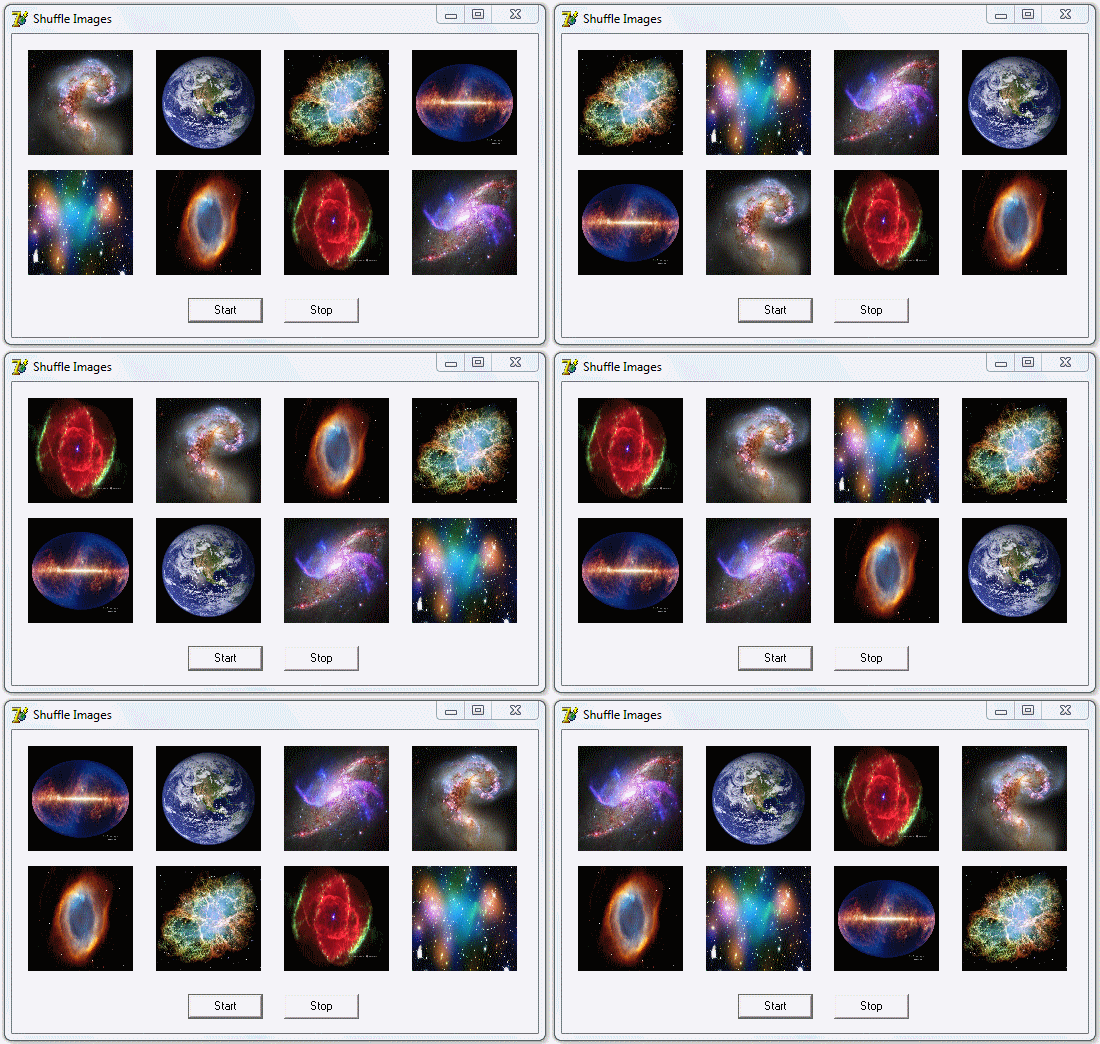


Nota: El código sugerido funciona análogamente con las funciones Randomize y Random.

Espero sea útil :)

Nelson.


La franja horaria es GMT +2. Ahora son las 13:09:22.

Powered by vBulletin® Version 3.6.8
Copyright ©2000 - 2026, Jelsoft Enterprises Ltd.
Traducción al castellano por el equipo de moderadores del Club Delphi