wolfran_hack,
Cita:
|
Empezado por wolfran_hack
...estoy intentando Importar un Archivos XLS a un ListView en D7...
|
Te sugiero usar el componente TStringGrid
el cual esta mejor adaptado en Delphi para la carga de una hoja de cálculo en Excel.
Revisa este código:
Código Delphi
[-]
unit Unit1;
interface
uses
Windows, Messages, SysUtils, Variants, Classes, Graphics, Controls, Forms,
Dialogs, Grids, ComObj, StdCtrls;
type
TForm1 = class(TForm)
Button1: TButton;
StringGrid1: TStringGrid;
procedure Button1Click(Sender: TObject);
private
public
end;
var
Form1: TForm1;
implementation
{$R *.dfm}
procedure TForm1.Button1Click(Sender: TObject);
var
Excel, WrkS, WrkB : OLEVariant;
Row, Col : Integer;
Rows, Cols : Integer;
begin
Excel := CreateOleObject('Excel.Application');
WrkB := Excel.Workbooks.Open(GetCurrentDir+'\TestData.xlsx');
WrkS := WrkB.Worksheets[1];
Cols := WrkS.UsedRange.Columns.Count;
Rows := WrkS.UsedRange.Rows.Count;
for Row:= 1 to StringGrid1.RowCount do
StringGrid1.Rows[Row].Clear;
StringGrid1.FixedRows := 1;
StringGrid1.FixedCols := 1;
StringGrid1.RowCount := Rows + 1;
StringGrid1.ColCount := Cols + 1;
for Row:= 1 to StringGrid1.RowCount do
for Col:= 1 to StringGrid1.ColCount do
StringGrid1.Cells[Col,Row]:= WrkS.Cells[Row,Col].Value;
Excel.Quit;
end;
end.
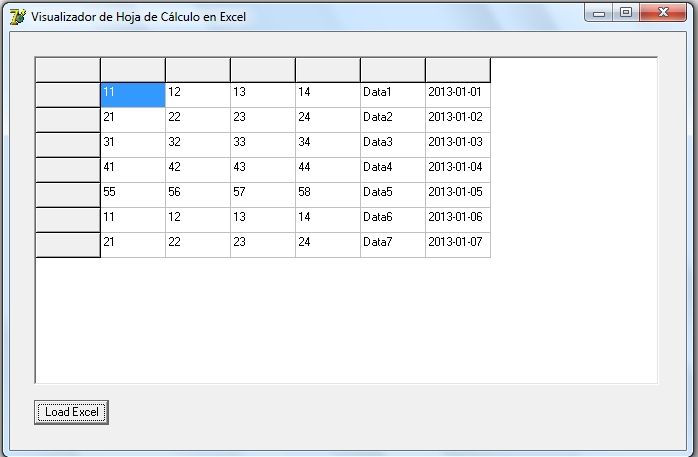
El código anterior en Delphi 7 bajo Windows 7 Professional x32,
carga una hoja de cálculo en el componente TStringGrid, como se puede ver en la siguiente imagen:
Espero sea útil

Nelson.