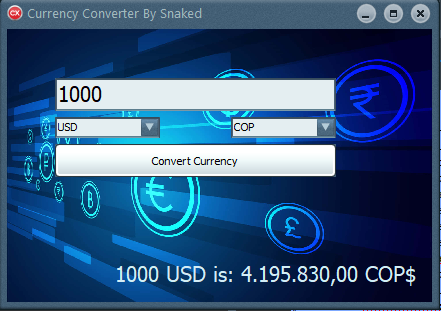
Me dio por trastear un poco con otra API web y decidí hacer este conversor de Moneda
Utilizo los alpha components para temas del Skin
os paso el codigo (obviamente faltaria el API Key claro, la modalidad gratuita de la web de Currencies creo que permite 100 consultas por mes)
utilizo el componente NetHttpClient para la consulta al API
Unit1.h
Código:
//---------------------------------------------------------------------------

#ifndef Unit1H
#define Unit1H
//---------------------------------------------------------------------------
#include <System.Classes.hpp>
#include <Vcl.Controls.hpp>
#include <Vcl.StdCtrls.hpp>
#include <Vcl.Forms.hpp>
#include <System.Net.HttpClient.hpp>
#include <System.Net.HttpClientComponent.hpp>
#include <System.Net.URLClient.hpp>
#include "sSkinManager.hpp"
#include <Vcl.ExtCtrls.hpp>
#include <Vcl.Imaging.jpeg.hpp>
#include "sComboBox.hpp"
#include "sCustomComboEdit.hpp"
#include "sEdit.hpp"
#include "sMaskEdit.hpp"
#include <Vcl.Mask.hpp>
//---------------------------------------------------------------------------
class TForm1 : public TForm
{
__published:	// IDE-managed Components
	TLabel *Label1;
	TButton *Button1;
	TNetHTTPClient *NetHTTPClient1;
	TMemo *Memo1;
	TImage *Image1;
	TsSkinManager *sSkinManager1;
	TsEdit *Edit1;
	TsComboBox *ComboBox1;
	TsComboBox *ComboBox2;
	void __fastcall Button1Click(TObject *Sender);
	void __fastcall FormCreate(TObject *Sender);
private:	// User declarations
public:		// User declarations
	__fastcall TForm1(TComponent* Owner);
};
//---------------------------------------------------------------------------
extern PACKAGE TForm1 *Form1;
//---------------------------------------------------------------------------
#endif
Código:
//---------------------------------------------------------------------------
#include <vcl.h>
#pragma hdrstop
#include "Unit1.h"
#include <System.JSON.hpp>
#include <System.Net.HttpClient.hpp>
#include <System.Net.URLClient.hpp>
#include <System.Net.HttpClientComponent.hpp>

#include <System.SysUtils.hpp> // Asegúrate de incluir esto


//---------------------------------------------------------------------------
#pragma package(smart_init)
#pragma link "sSkinManager"
#pragma link "sComboBox"
#pragma link "sCustomComboEdit"
#pragma link "sEdit"
#pragma link "sMaskEdit"
#pragma resource "*.dfm"
TForm1 *Form1;
//---------------------------------------------------------------------------
__fastcall TForm1::TForm1(TComponent* Owner)
	: TForm(Owner)
{
}
//---------------------------------------------------------------------------

String getSimboloMoneda(String codigo) {
    if (codigo == "USD") return "$";
    if (codigo == "EUR") return "€";
    if (codigo == "GBP") return "£";
    if (codigo == "JPY") return "¥";
    if (codigo == "COP") return "$"; // Peso colombiano también usa $
    if (codigo == "ARS") return "$"; // Peso argentino
    if (codigo == "BRL") return "R$";
    return codigo; // Por defecto, muestra el código
}

  // Conversor de Divisas usando C++ Builder y ExchangeRate-API
// Este ejemplo asume que usas un Form con:
// - ComboBox1: moneda origen
// - ComboBox2: moneda destino
// - Edit1: cantidad a convertir
// - Button1: botón "Convertir"
// - Label1: resultado
// Asegúrate de agregar TNetHTTPClient desde la Tool Palette


void __fastcall TForm1::Button1Click(TObject *Sender)
{

	String fromCurrency = ComboBox1->Text;
	String toCurrency = ComboBox2->Text;
	double cantidad = StrToFloatDef(Edit1->Text, -1);

TFormatSettings formato;
GetLocaleFormatSettings(0, formato); // Carga valores predeterminados

// Ahora forzamos los europeos
formato.DecimalSeparator = ',';
formato.ThousandSeparator = '.';
formato.CurrencyString = "€"; // Opcional si vas a mostrar moneda
formato.CurrencyFormat = 3;   // Simbolito después del número


	if (cantidad < 0) {
		ShowMessage("Cantidad no válida");
		return;
	}

   String url = "https://api.apilayer.com/currency_data/convert?to=" + toCurrency + "&from=" + fromCurrency + "&amount=" + FloatToStr(cantidad);

			 TNetHeaders headers;
			 headers.set_length(1);
			 headers[0].Name = "apikey";
			 headers[0].Value = " ";  //Aqui tu clave de API


	try {
		  String respuesta = NetHTTPClient1->Get(url, NULL, headers)->ContentAsString();
		//ShowMessage(respuesta);  // Aquí puedes hacer parseo del JSON
		Memo1->Text = respuesta;

		TJSONValue *json = TJSONObject::ParseJSONValue(respuesta);
		TJSONObject *root = dynamic_cast<TJSONObject*>(json);

	   if (root && root->GetValue("result"))
	   {
			TJSONValue *valor = root->GetValue("result");
			TJSONNumber *num = dynamic_cast<TJSONNumber*>(valor);

		if (num)
		{
			double resultado = num->AsDouble;
			String simbolo = getSimboloMoneda(toCurrency);

			Label1->Caption = FloatToStr(cantidad) + " " + fromCurrency + " is: " + FormatFloat("#,##0.00", resultado, formato) + " " + toCurrency + simbolo;
		} else {
				 ShowMessage("Error: 'result' no es numérico");
				 }
	   } else {
			   ShowMessage("No se encontró el campo 'result'");
				}

delete json;
	}
	catch (Exception &e) {
		ShowMessage("Error al obtener datos: " + e.Message);
	}
}

//---------------------------------------------------------------------------
void __fastcall TForm1::FormCreate(TObject *Sender)
{
	ComboBox1->Items->Add("USD");
	ComboBox1->Items->Add("EUR");
	ComboBox1->Items->Add("ARS");
	ComboBox1->Items->Add("BRL");
	ComboBox1->Items->Add("COP");
	ComboBox1->Items->Add("GBP");
	ComboBox1->Items->Add("JPY");
	ComboBox1->Items->Add("MXN");

	ComboBox2->Items->Add("USD");
	ComboBox2->Items->Add("EUR");
	ComboBox2->Items->Add("ARS");
	ComboBox2->Items->Add("BRL");
	ComboBox2->Items->Add("COP");
	ComboBox2->Items->Add("GBP");
	ComboBox2->Items->Add("JPY");
	ComboBox2->Items->Add("MXN");

	ComboBox1->ItemIndex = 0;
	ComboBox2->ItemIndex = 2; // Por ejemplo ARS
}
//---------------------------------------------------------------------------