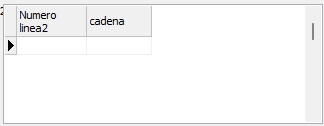
Con el TjvdbGrid puedes.
Pones AutoSizeRows a False, TitleRowHeight a un número que quepan las líneas (p.e. 30) y WordWarp a True para que lo centre.
Después usas retornos de carro en los títulos.
Te dejo un DFM de ejemplo que puedes copiar y pegar en un Form
Código Delphi [-]
object grd1: TJvDBGrid
  Left = 65
  Top = 45
  Width = 320
  Height = 120
  DataSource = ds1
  TabOrder = 1
  TitleFont.Charset = DEFAULT_CHARSET
  TitleFont.Color = clWindowText
  TitleFont.Height = -11
  TitleFont.Name = 'Tahoma'
  TitleFont.Style = []
  SelectColumnsDialogStrings.Caption = 'Select columns'
  SelectColumnsDialogStrings.OK = '&OK'
  SelectColumnsDialogStrings.NoSelectionWarning = 'At least one column must be visible!'
  EditControls = <>
  AutoSizeRows = False
  RowsHeight = 17
  TitleRowHeight = 30
  WordWrap = True
end
object mdata1: TJvMemoryData
  Active = True
  FieldDefs = <
    item
      Name = 'Numero'
      DataType = ftInteger
    end
    item
      Name = 'cadena'
      DataType = ftString
      Size = 10
    end>
  Left = 115
  Top = 135
  object intgrfldmdata1Numero: TIntegerField
    DisplayLabel = 'Numero'#13#10'linea2'
    FieldName = 'Numero'
  end
  object strngfldmdata1cadena: TStringField
    FieldName = 'cadena'
    Size = 10
  end
end
object ds1: TDataSource
  DataSet = mdata1
  Left = 180
  Top = 145
end